#1 Restaurant Reviews application
#1 Restaurant Reviews application




200+ 5 Star Reviews
200+ 5 Star Reviews
Transforming
Transforming
Transforming
Yelp
Yelp
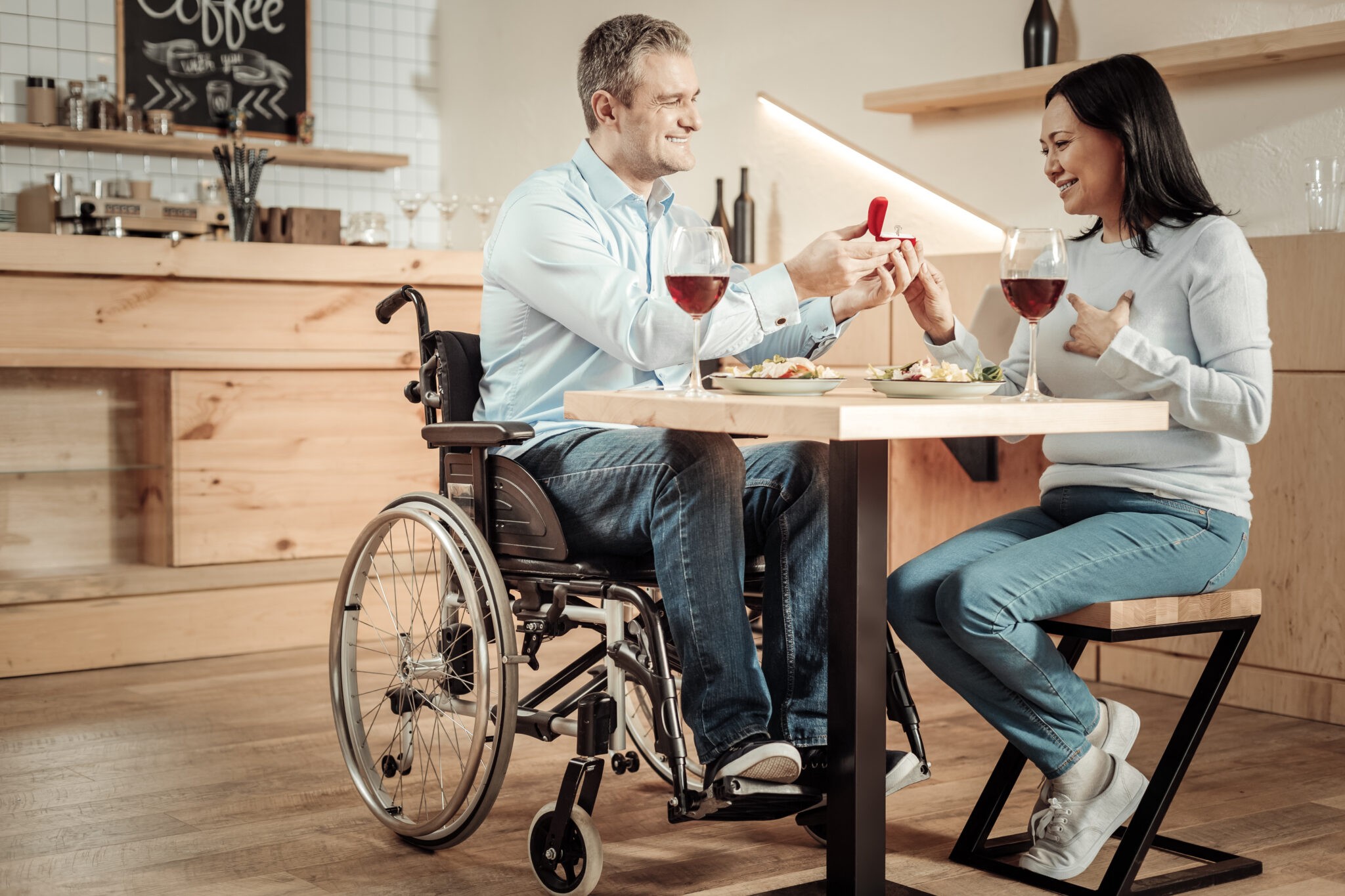
Empowering wheelchair users for inclusive dining experiences
Empowering wheelchair users for inclusive dining experiences
Empowering wheelchair users for inclusive dining experiences
Duration
6 weeks
Duration
6 weeks
Client
Class Proejct
Client
Class Proejct
Project Type
UX Design
Project Type
UX Design
Teammates
Nidhi B Gowda, Ivory Zhao, Jimin Hong
Teammates
Nidhi B Gowda, Ivory Zhao, Jimin Hong
Duration
6 weeks
Duration
6 weeks
Client
Class Proejct
Client
Class Proejct
Project Type
UX Design
Project Type
UX Design
Teammates
Nidhi B Gowda, Ivory Zhao, Jimin Hong
Teammates
Nidhi B Gowda, Ivory Zhao, Jimin Hong
01
Overview
01
Overview
The project aims to develop a website that assists wheelchair users in selecting an appropriate restaurant to solve the problem of current websites which has a significant lack of dedicated information on inclusivity and accessibility. The choice of focusing on Yelp was influenced by findings from user research, which highlighted the popularity of Yelp for searching and booking purposes. Recognizing the potential to make an impact on this, we committed to transforming Yelp into a more accessibility-focused platform, aiming to fill the gaps in information and functionality that currently exist for wheelchair users.
The project aims to develop a website that assists wheelchair users in selecting an appropriate restaurant to solve the problem of current websites which has a significant lack of dedicated information on inclusivity and accessibility. The choice of focusing on Yelp was influenced by findings from user research, which highlighted the popularity of Yelp for searching and booking purposes. Recognizing the potential to make an impact on this, we committed to transforming Yelp into a more accessibility-focused platform, aiming to fill the gaps in information and functionality that currently exist for wheelchair users.
The project aims to develop a website that assists wheelchair users in selecting an appropriate restaurant to solve the problem of current websites which has a significant lack of dedicated information on inclusivity and accessibility. The choice of focusing on Yelp was influenced by findings from user research, which highlighted the popularity of Yelp for searching and booking purposes. Recognizing the potential to make an impact on this, we committed to transforming Yelp into a more accessibility-focused platform, aiming to fill the gaps in information and functionality that currently exist for wheelchair users.
02
Problem Statement
02
Problem Statement
Upon performing user interviews and web analysis of Yelp, certain observations and frustrations were brought to light. Yelp has made the minimal effort to provide wheelchair-specific content, leaving users with limited options and information regarding accessibility within restaurants.
Upon performing user interviews and web analysis of Yelp, certain observations and frustrations were brought to light. Yelp has made the minimal effort to provide wheelchair-specific content, leaving users with limited options and information regarding accessibility within restaurants.
Upon performing user interviews and web analysis of Yelp, certain observations and frustrations were brought to light. Yelp has made the minimal effort to provide wheelchair-specific content, leaving users with limited options and information regarding accessibility within restaurants.
03
Design Process
03
Design Process
04
Primary User Research
04
Primary User Research
04
Primary User Research
Primary user reseach includes user interviews, observations, and contextual inquiry
Primary user reseach includes user interviews, observations, and contextual inquiry
Primary user reseach includes user interviews, observations, and contextual inquiry
3+
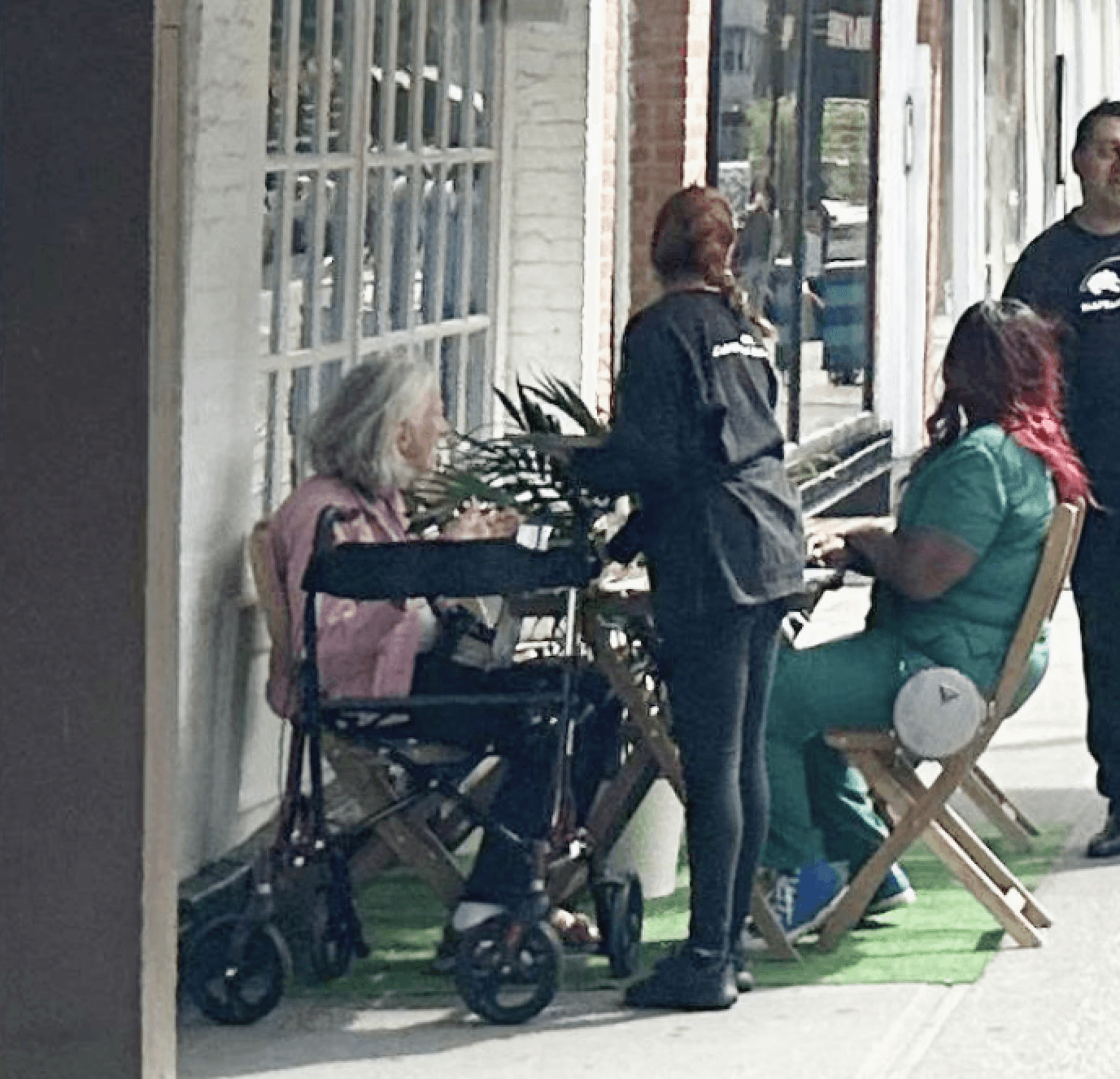
semi-structured interviews
The interview aimed to delve into the participant's personal experiences, challenges, and preferences when it came to dining out.
Contextual Inquiry and Observation
6+
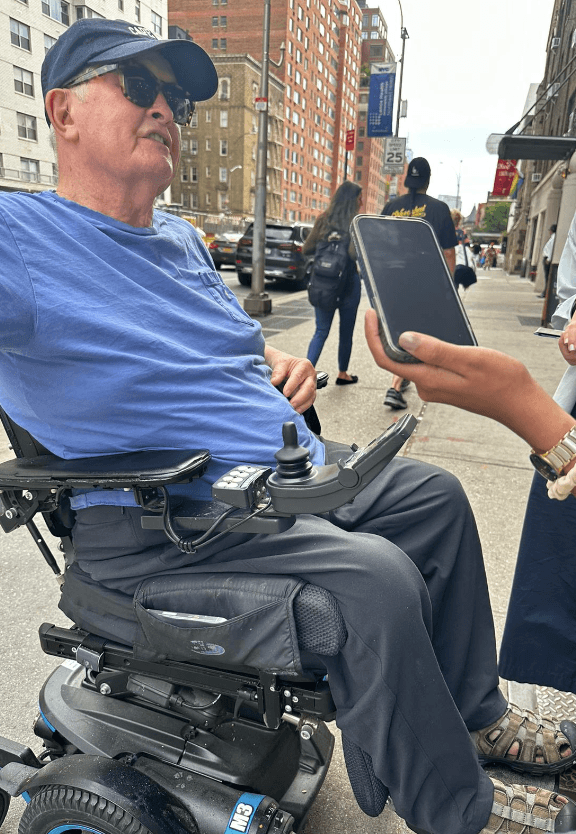
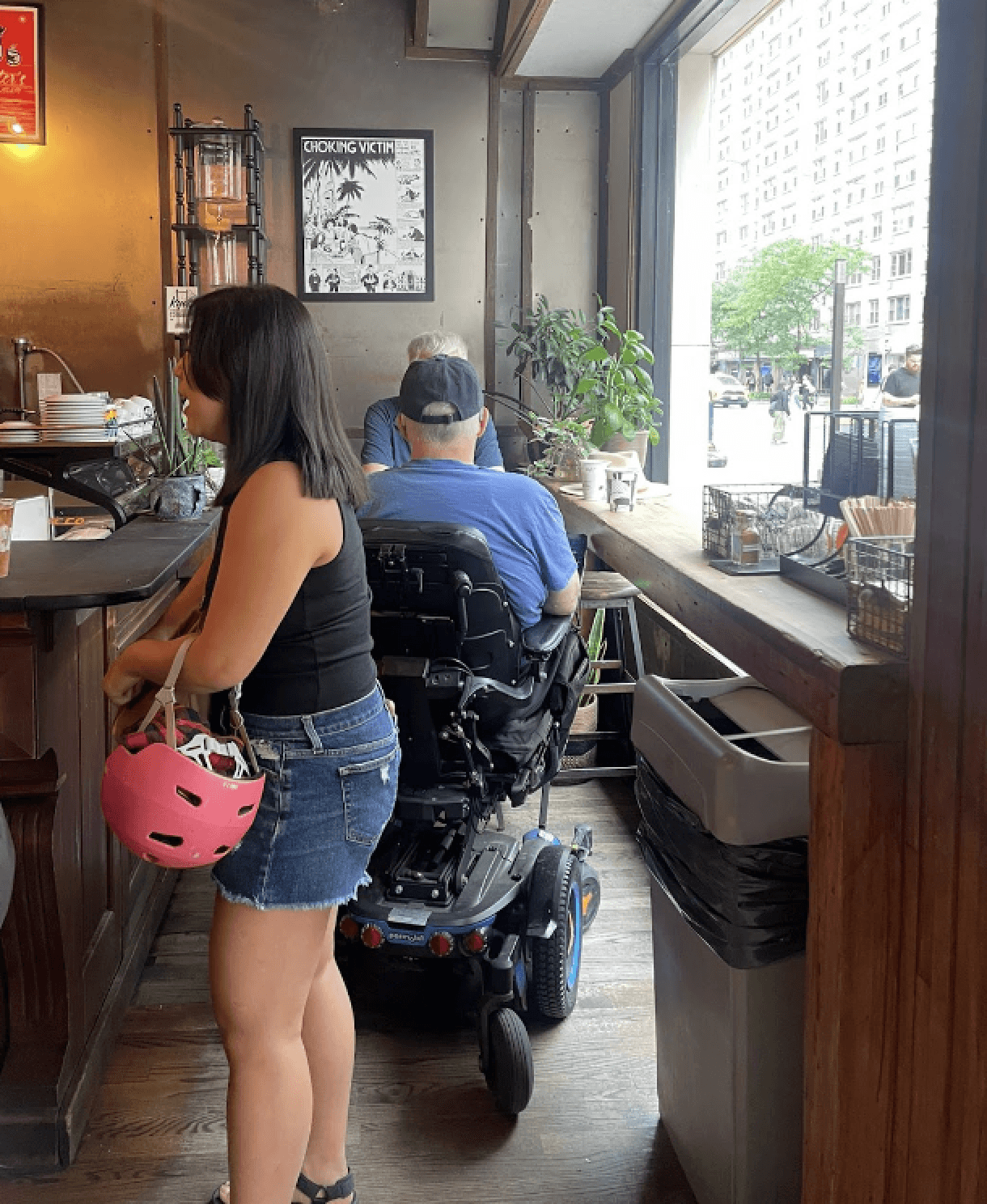
These observations focused on interactions with the physical environment and others, providing crucial insights into the real-world challenges that wheelchair users face during dining experiences.
Observations were conducted at a restaurant in New York, where a wheelchair user dined with her care provider. Two contextual inquiries were in a park and another in a coffee shop—where the participant used a motorized wheelchair.
Key Findings
01
Challenges
01
Challenges
Narrow doorways
Narrow doorways
Steps
Steps
Non-compliant restroom facilities
Non-compliant restroom facilities
Other accessibility challenges
Other accessibility challenges
02
Selection Criteria
02
Selection Criteria
Restaurant ambiance
Restaurant ambiance
Comfortable seating
Comfortable seating
Staff Support
Staff Support
Accessible Restroom
Accessible Restroom
03
Pain Points
03
Pain Points
Outdated information
Outdated information
No online detailed accessibility checklist
No online detailed accessibility checklist
Reservation issues
Reservation issues
Inconsistent standards
Inconsistent standards
04
User Needs
04
User Needs
Trusted Information
Trusted Information
Trusted other user real feedback
Trusted other user real feedback
Ideal checklist for accessible features
Ideal checklist for accessible features
Restaurant disclosure
Restaurant disclosure
Key Findings
01
Challenges
01
Challenges
Narrow doorways
Narrow doorways
Steps
Steps
Non-compliant restroom facilities
Non-compliant restroom facilities
Other accessibility challenges
Other accessibility challenges
02
Selection Criteria
02
Selection Criteria
Restaurant ambiance
Restaurant ambiance
Comfortable seating
Comfortable seating
Staff Support
Staff Support
Accessible Restroom
Accessible Restroom
03
Pain Points
03
Pain Points
Outdated information
Outdated information
No online detailed accessibility checklist
No online detailed accessibility checklist
Reservation issues
Reservation issues
Inconsistent standards
Inconsistent standards
04
User Needs
04
User Needs
Trusted Information
Trusted Information
Trusted other user real feedback
Trusted other user real feedback
Ideal checklist for accessible features
Ideal checklist for accessible features
Restaurant disclosure
Restaurant disclosure
04
Yelp Analysis
04
Yelp Analysis
We analyzed Yelp to identify how well it supports wheelchair users and areas needing improvement. While Yelp facilitates informed dining choices through reviews and ratings, it lacks comprehensive accessibility features. There's no standardized accessibility checklist, and details are scattered within reviews, complicating the search for suitable venues. Additionally, the reservation process doesn't adequately support accessibility needs. Although Yelp is useful for general information, enhancing its accessibility features could significantly improve the experience for users with specific needs.
We analyzed Yelp to identify how well it supports wheelchair users and areas needing improvement. While Yelp facilitates informed dining choices through reviews and ratings, it lacks comprehensive accessibility features. There's no standardized accessibility checklist, and details are scattered within reviews, complicating the search for suitable venues. Additionally, the reservation process doesn't adequately support accessibility needs. Although Yelp is useful for general information, enhancing its accessibility features could significantly improve the experience for users with specific needs.
We analyzed Yelp to identify how well it supports wheelchair users and areas needing improvement. While Yelp facilitates informed dining choices through reviews and ratings, it lacks comprehensive accessibility features. There's no standardized accessibility checklist, and details are scattered within reviews, complicating the search for suitable venues. Additionally, the reservation process doesn't adequately support accessibility needs. Although Yelp is useful for general information, enhancing its accessibility features could significantly improve the experience for users with specific needs.
Key Insights
01
Enhance Search Filters
01
Enhance Search Filters
01
Enhance Search Filters
Yelp needs to allow users to filter search results by specific accessibility features, such as wheelchair-accessible entrances and restrooms.
Yelp needs filter search results by specific accessibility features, such as entrances, steps, and restromm info.
Yelp needs filter search results by specific accessibility features, such as entrances, steps, and restromm info.
02
Inclusive Visual Content
02
Inclusive Visual Content
02
Inclusive Visual Content
Introduce photos from a wheelchair user’s perspective to better showcase restaurant layouts and seating options.
Introduce photos from a wheelchair user’s perspective to better showcase restaurant layouts and seating options.
Introduce photos from a wheelchair user’s perspective to better showcase restaurant layouts and seating options.
03
Detailed Information
03
Detailed Information
03
Detailed Information
Restaurant listings should include accessibility details like bathroom access, handicap parking specifics, and so on.
Restaurant listings should include accessibility details like bathroom access, handicap parking specifics, and so on.
Restaurant listings should include accessibility details like bathroom access, handicap parking specifics, and so on.
04
Reservation
04
Reservation
04
Reservation
Note accessibility needs and provide information on multi-story access like elevator dimensions and control heights.
Note accessibility needs and provide information on multi-story access like elevator dimensions and control heights.
Note accessibility needs and provide information on multi-story access like elevator dimensions and control heights.
05
Research Methodology
05
Research Methodology
We Developed Affinity Map, Mental Model, Task Model and Content Requirement to investigate user behavior patterns further and explore how the tasks in our system could be demonstrated to align with users' expectations
We Developed Affinity Map, Mental Model, Task Model and Content Requirement to investigate user behavior patterns further and explore how the tasks in our system could be demonstrated to align with users' expectations
We Developed Affinity Map, Mental Model, Task Model and Content Requirement to investigate user behavior patterns further and explore how the tasks in our system could be demonstrated to align with users' expectations
Affinity Map
Affinity Map
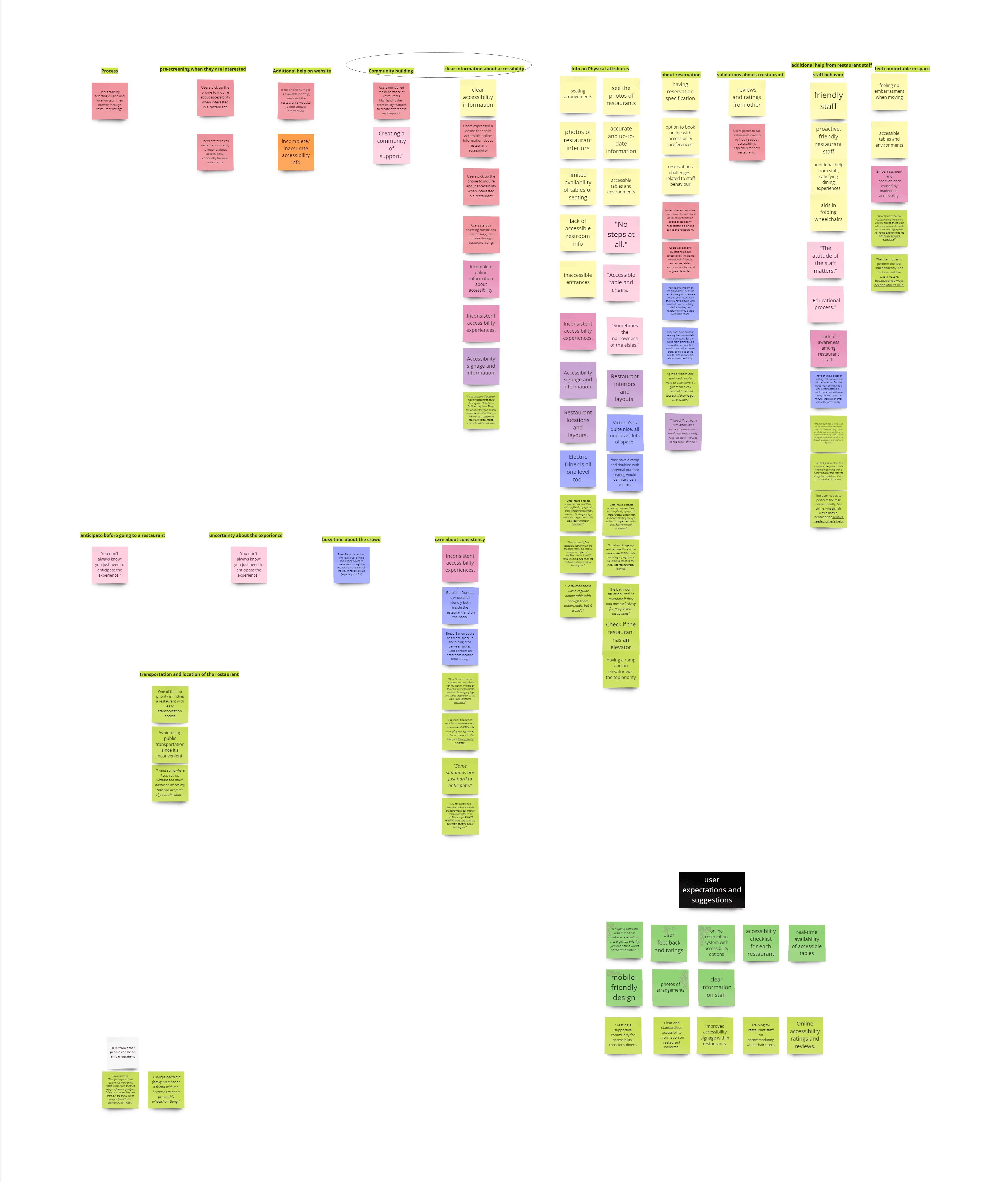
The aim of our affinity diagram is to systematically organize user data from interviews, observations, and inquiries, facilitating the identification of patterns and commonalities in needs and challenges faced by wheelchair users. Through this analysis, we pinpointed a frequent demand for details on physical attributes and customer service quality.
70%
Wheelchair users need a prioritized display of accessibility information.
80%
Wheelchair users find it difficult to find up-to-date information sources.
Affinity Map
Affinity Map
The aim of our affinity diagram is to systematically organize user data from interviews, observations, and inquiries, facilitating the identification of patterns and commonalities in needs and challenges faced by wheelchair users. Through this analysis, we pinpointed a frequent demand for details on physical attributes and customer service quality.
70%
Wheelchair users need a prioritized display of accessibility information.
80%
Wheelchair users find it difficult to find up-to-date information sources.
Affinity Map
Affinity Map
The aim of our affinity diagram is to systematically organize user data from interviews, observations, and inquiries, facilitating the identification of patterns and commonalities in needs and challenges faced by wheelchair users. Through this analysis, we pinpointed a frequent demand for details on physical attributes and customer service quality.
70%
Wheelchair users need a prioritized display of accessibility information.
80%
Wheelchair users find it difficult to find up-to-date information sources.
Mental Model
Mental Model
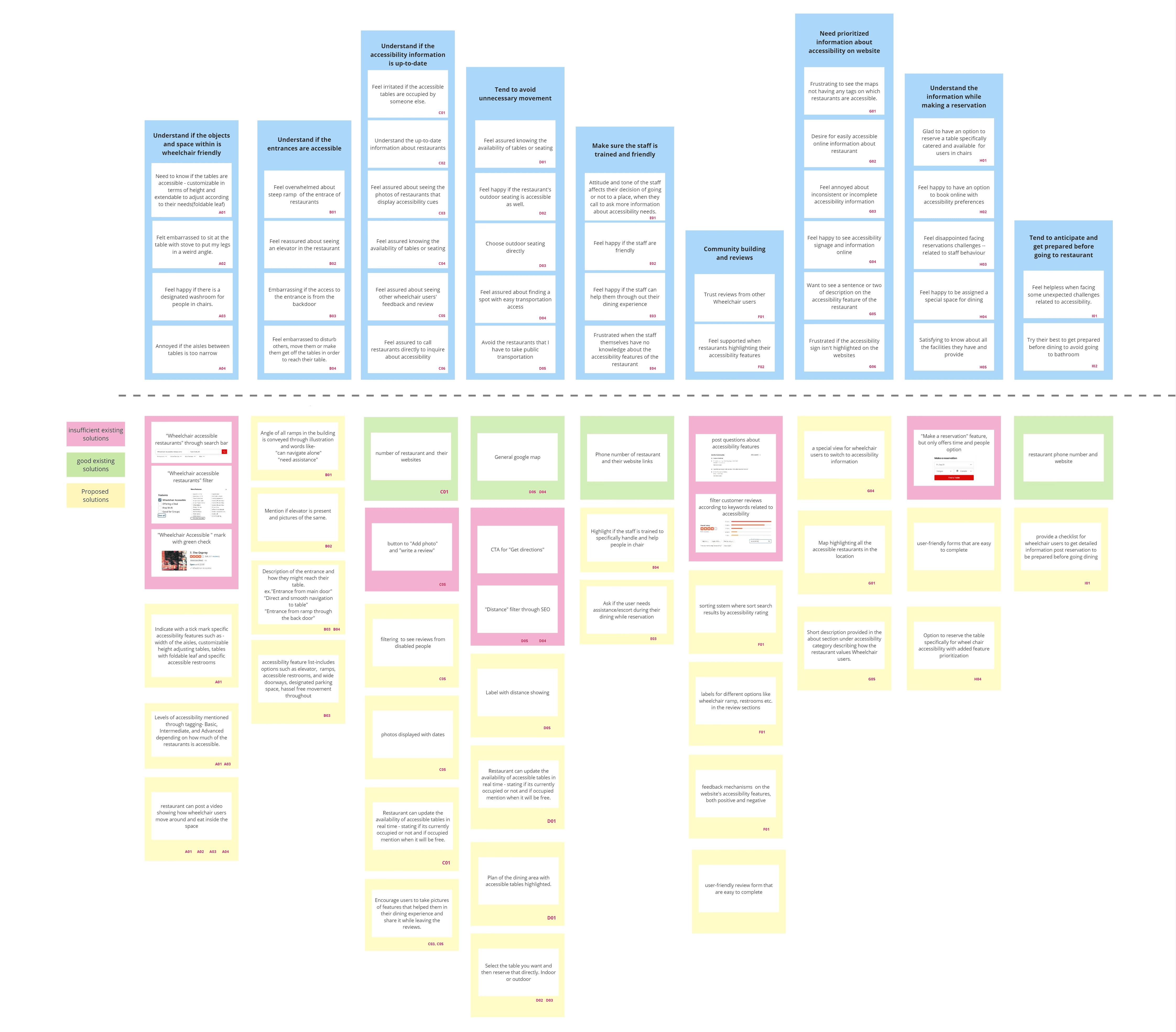
The aim of our affinity diagram is to systematically organize user data from interviews, observations, and inquiries, facilitating the identification of patterns and commonalities in needs and challenges faced by wheelchair users. Through this analysis, we pinpointed a frequent demand for details on physical attributes and customer service quality.
80%
Clear communication of accessibility-specialized needs is needed by users.
70%
Wheelchair users feel bothered by the inconsistent accessibility features between restaurants’ claim and reality.
Mental Model
Mental Model
The aim of our affinity diagram is to systematically organize user data from interviews, observations, and inquiries, facilitating the identification of patterns and commonalities in needs and challenges faced by wheelchair users. Through this analysis, we pinpointed a frequent demand for details on physical attributes and customer service quality.
80%
Clear communication of accessibility-specialized needs is needed by users.
70%
Wheelchair users feel bothered by the inconsistent accessibility features between restaurants’ claim and reality.
Mental Model
Mental Model
The aim of our affinity diagram is to systematically organize user data from interviews, observations, and inquiries, facilitating the identification of patterns and commonalities in needs and challenges faced by wheelchair users. Through this analysis, we pinpointed a frequent demand for details on physical attributes and customer service quality.
80%
Clear communication of accessibility-specialized needs is needed by users.
70%
Wheelchair users feel bothered by the inconsistent accessibility features between restaurants’ claim and reality.
The solution space for enhancing Yelp's accessibility for wheelchair users includes several key enhancements:
Ramp Information
Accessibility Checklist
Review Filters
Feature Image Gallery
Specific Reservation
Detailed Checklist
Ramp Information
Accessibility Checklist
Review Filters
Feature Image Gallery
Specific Reservation
Detailed Checklist
Task Model
Task Model
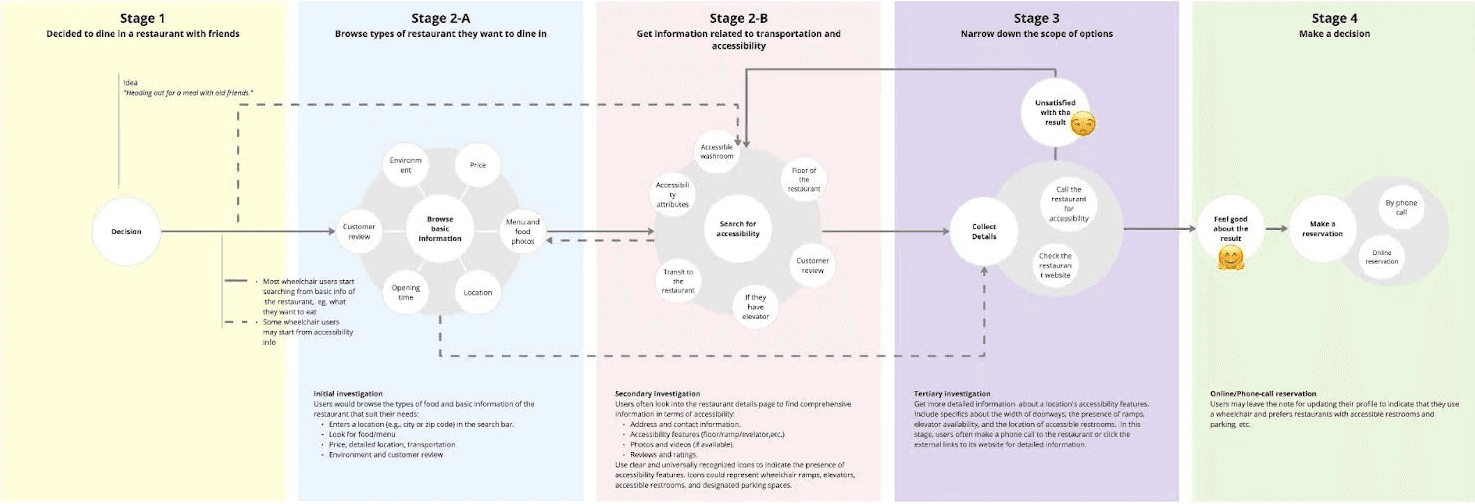
Initial Browse (Stage 1): Users start with a general search focusing on their preferred cuisine and gather basic information about potential restaurants. Accessibility Check (Stage 2): Primary Sequence (Stage 2-A): Most users first confirm the restaurant's cuisine and basic details before delving into more comprehensive accessibility information. Alternative Sequence (Stage 2-B): A subset of users prioritize checking accessibility features before considering the type of food offered. Direct Verification (Stage 3): Users then contact the restaurant directly or visit their website for more detailed and specific information regarding accessibility and other inquiries. Final Decision (Stage 4): This stage involves making the final decision to visit the restaurant based on the information gathered through the previous stages.
Task Model
Task Model
Initial Browse (Stage 1): Users start with a general search focusing on their preferred cuisine and gather basic information about potential restaurants. Accessibility Check (Stage 2): Primary Sequence (Stage 2-A): Most users first confirm the restaurant's cuisine and basic details before delving into more comprehensive accessibility information. Alternative Sequence (Stage 2-B): A subset of users prioritize checking accessibility features before considering the type of food offered. Direct Verification (Stage 3): Users then contact the restaurant directly or visit their website for more detailed and specific information regarding accessibility and other inquiries. Final Decision (Stage 4): This stage involves making the final decision to visit the restaurant based on the information gathered through the previous stages.
Content Requirements
Content Requirements
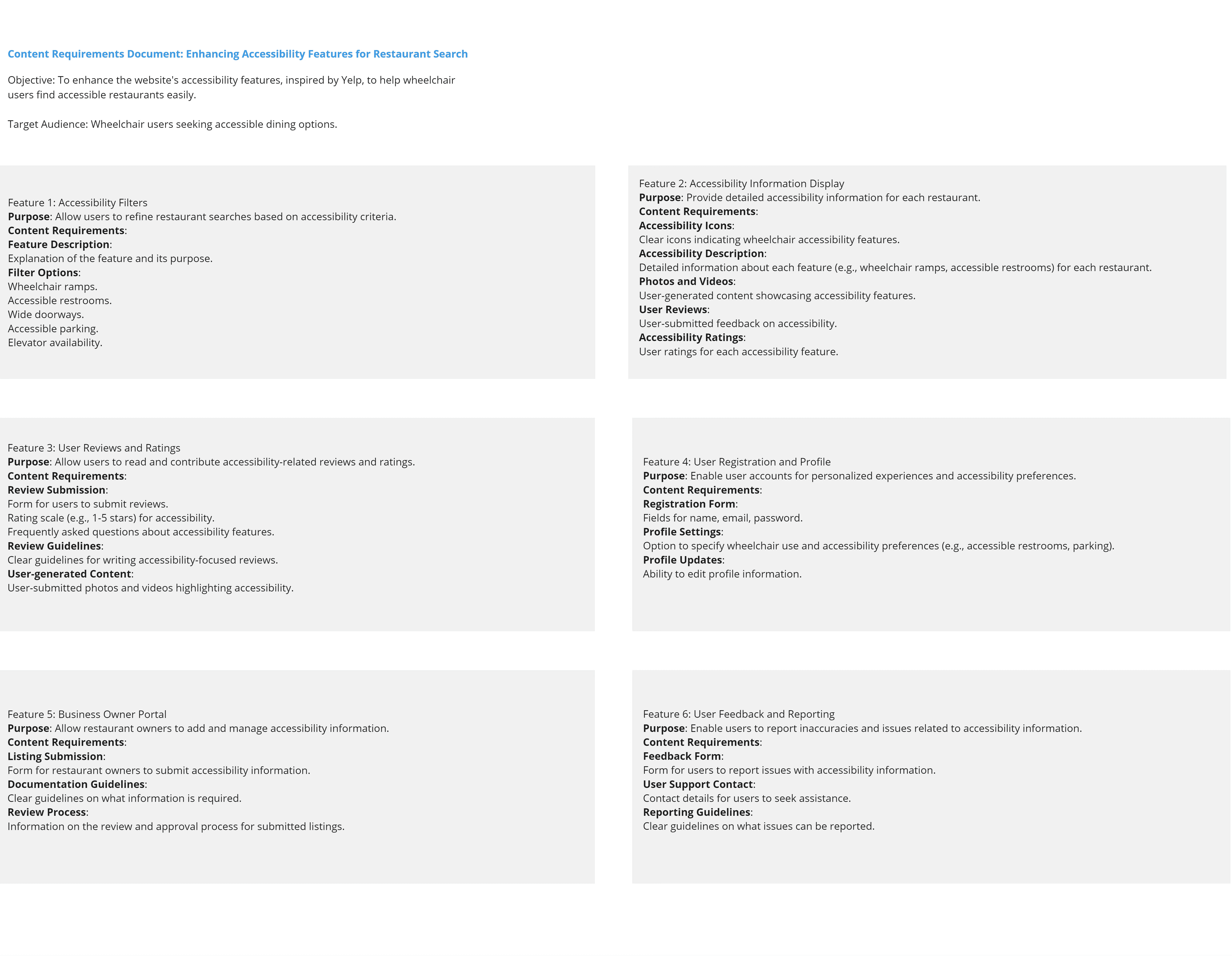
To create content for a website aiding wheelchair users in selecting accessible restaurants, define the purpose and scope, summarize accessibility research, and set clear content objectives. Develop categories, guidelines, and a content map, integrate SEO, conduct accessibility testing, incorporate user feedback, and manage content iteratively. This structured approach ensures the website meets the needs of its users effectively.
Content Requirements
Content Requirements
To create content for a website aiding wheelchair users in selecting accessible restaurants, define the purpose and scope, summarize accessibility research, and set clear content objectives. Develop categories, guidelines, and a content map, integrate SEO, conduct accessibility testing, incorporate user feedback, and manage content iteratively. This structured approach ensures the website meets the needs of its users effectively.
IA
Information Architecture
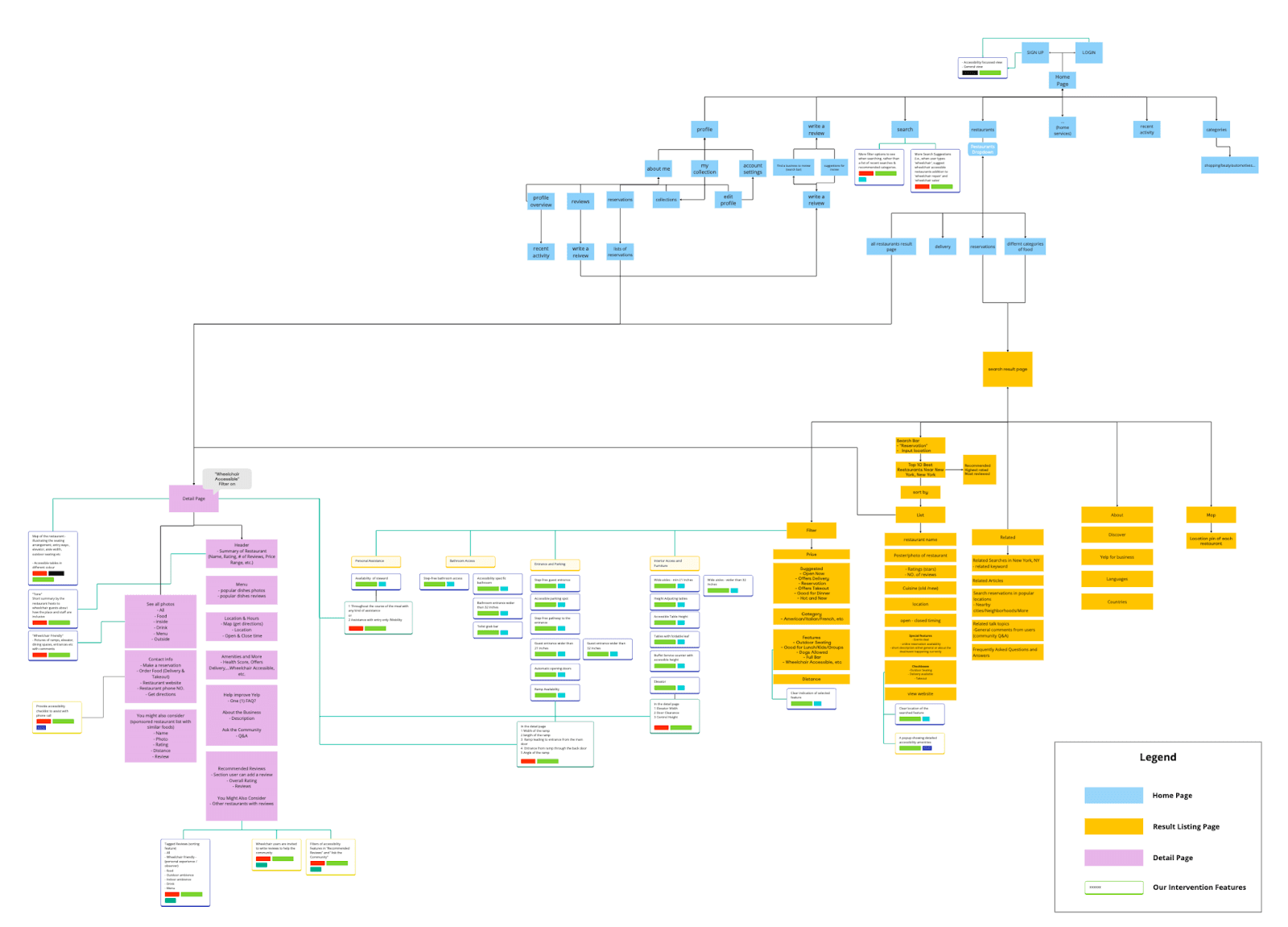
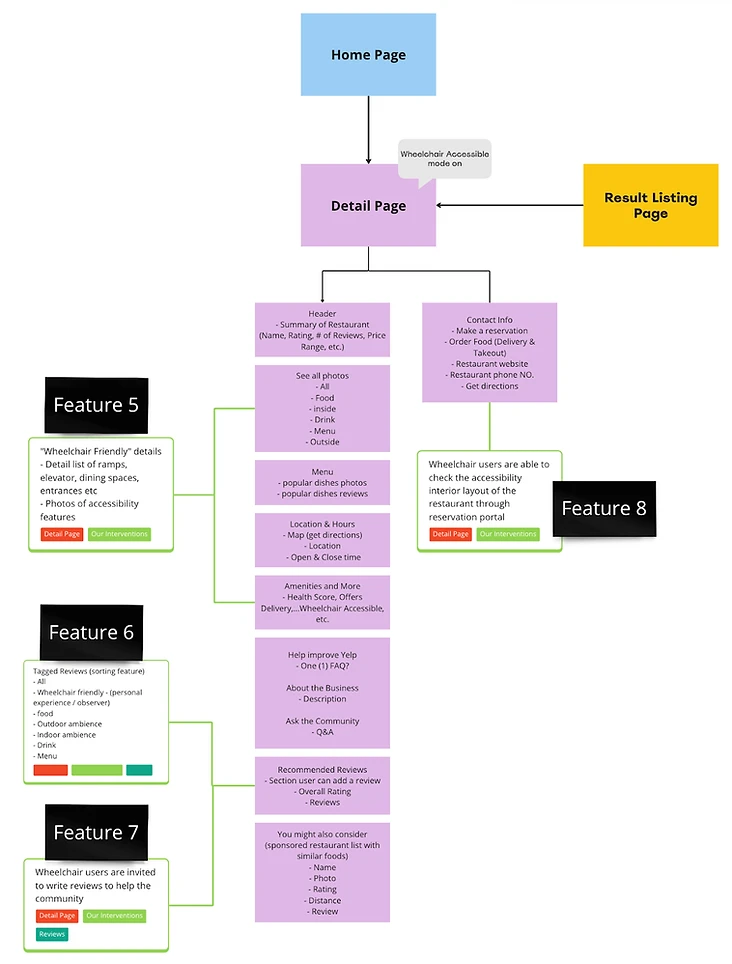
During our development process, we identified three crucial sections of the website: the Home page, the Result Listing page, and the Restaurant Detail page, all of which are focal points of our design efforts. We then conducted initial brainstorming sessions to explore various design directions. These ideas were integrated into the website's information architecture, laying a foundation for a user-centric and accessible layout that enhances the dining experience for wheelchair users.
IA
Information Architecture
During our development process, we identified three crucial sections of the website: the Home page, the Result Listing page, and the Restaurant Detail page, all of which are focal points of our design efforts. We then conducted initial brainstorming sessions to explore various design directions. These ideas were integrated into the website's information architecture, laying a foundation for a user-centric and accessible layout that enhances the dining experience for wheelchair users.
06
Low-Fi Wireframes
06
Low-Fi Wireframes
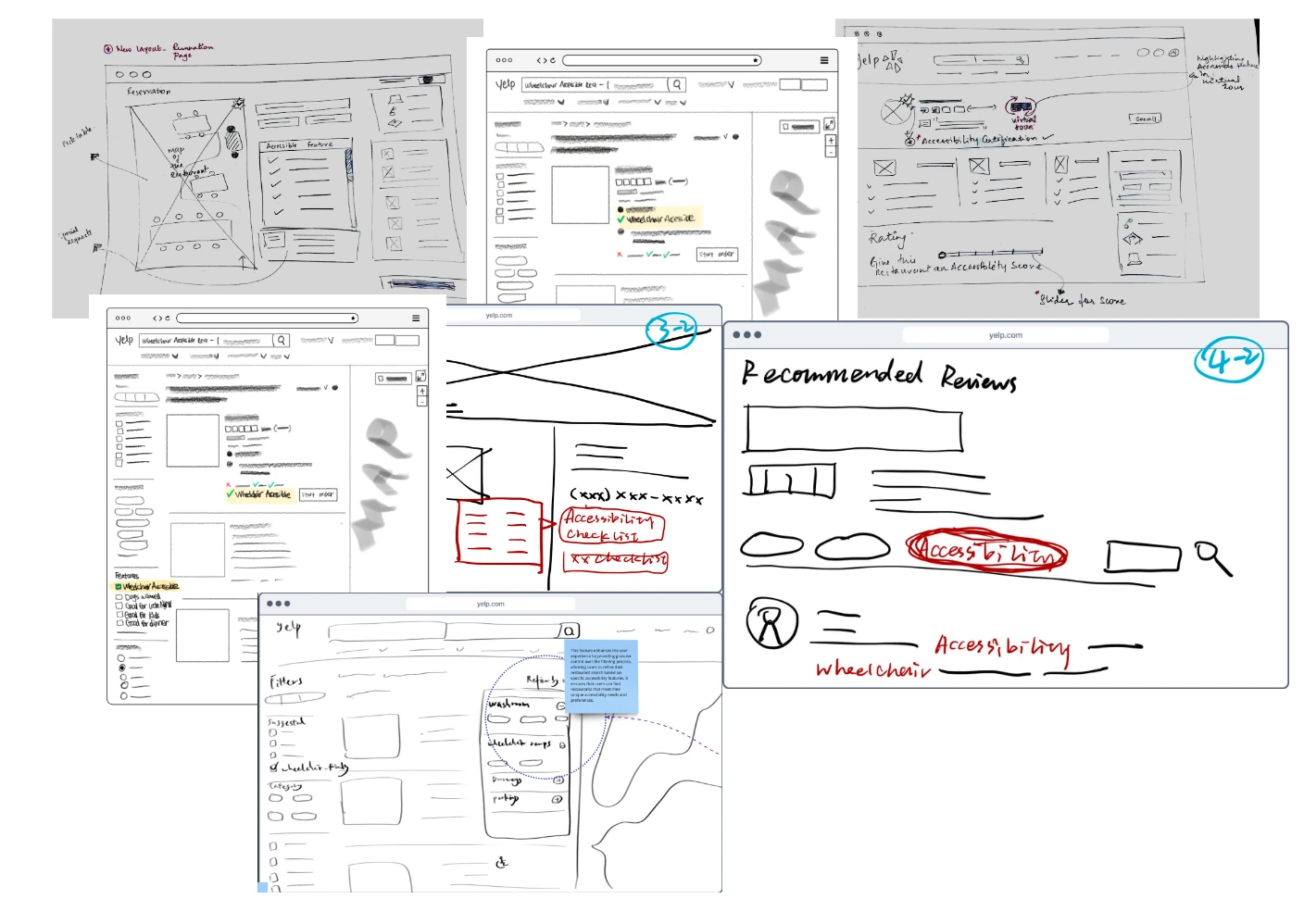
We Developed Affinity Map, Mental Model, Task Model and Content Requirement to investigate user behavior patterns further and explore how the tasks in our system could be demonstrated to align with users' expectations
We Developed Affinity Map, Mental Model, Task Model and Content Requirement to investigate user behavior patterns further and explore how the tasks in our system could be demonstrated to align with users' expectations
We Developed Affinity Map, Mental Model, Task Model and Content Requirement to investigate user behavior patterns further and explore how the tasks in our system could be demonstrated to align with users' expectations
07
Feature Intervention
07
Feature Intervention
We structured the website into three main sections: Home, Result Listing, and Restaurant Detail pages. After reviewing collective paper wireframes, we decided to advance the design by integrating eight new features into the existing information architecture for better clarity and functionality.
We structured the website into three main sections: Home, Result Listing, and Restaurant Detail pages. After reviewing collective paper wireframes, we decided to advance the design by integrating eight new features into the existing information architecture for better clarity and functionality.
We structured the website into three main sections: Home, Result Listing, and Restaurant Detail pages. After reviewing collective paper wireframes, we decided to advance the design by integrating eight new features into the existing information architecture for better clarity and functionality.
Feature 1
Home Page
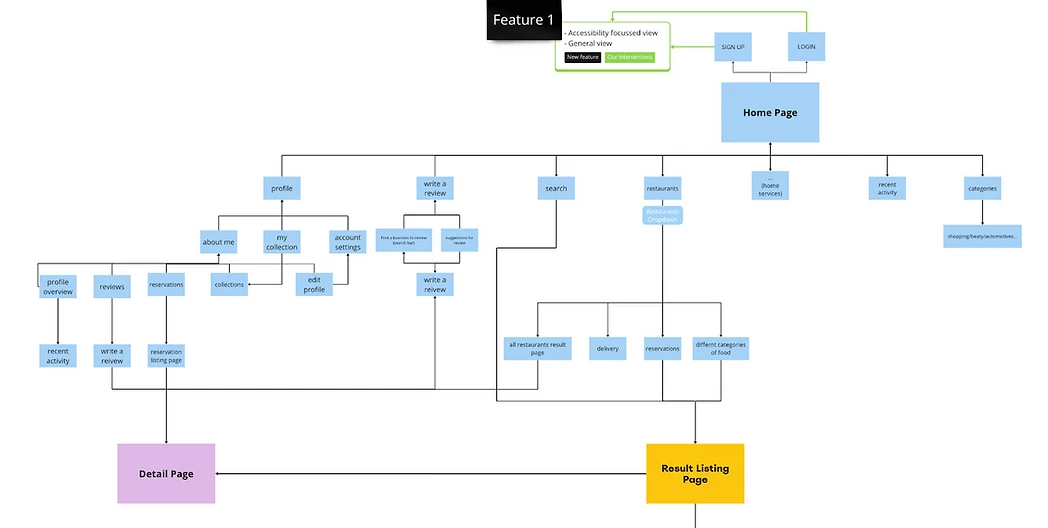
We have [Feature 1: Switching to “Wheelchair Accessibility Focused View” when logging in] placed on the home page. Wheelchair users can directly log in with this specialized mode for more prioritized accessibility-related content later.
Feature 1
Home Page
We have [Feature 1: Switching to “Wheelchair Accessibility Focused View” when logging in] placed on the home page. Wheelchair users can directly log in with this specialized mode for more prioritized accessibility-related content later.
Feature 2, 3 & 4
Result Listing Page
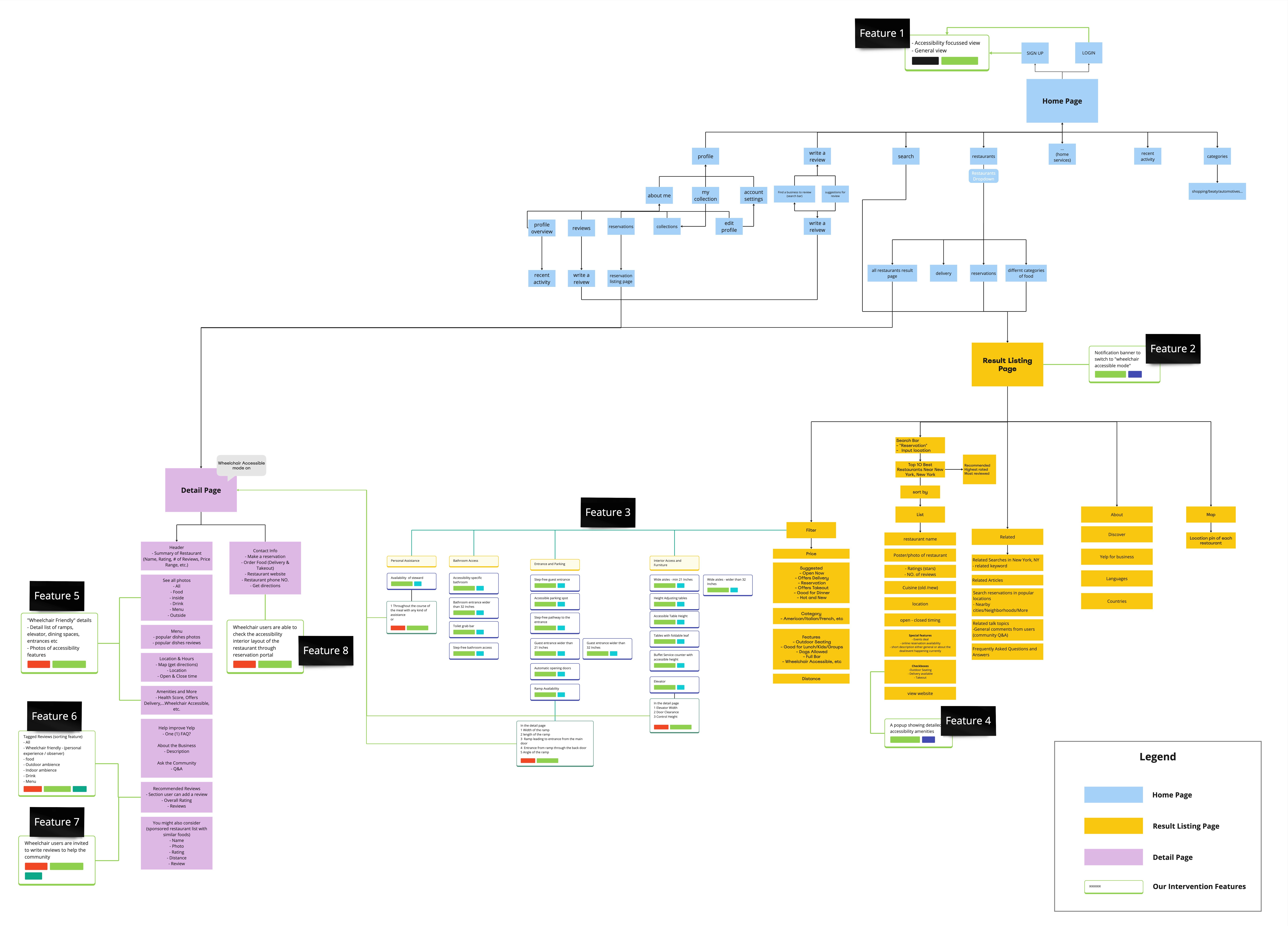
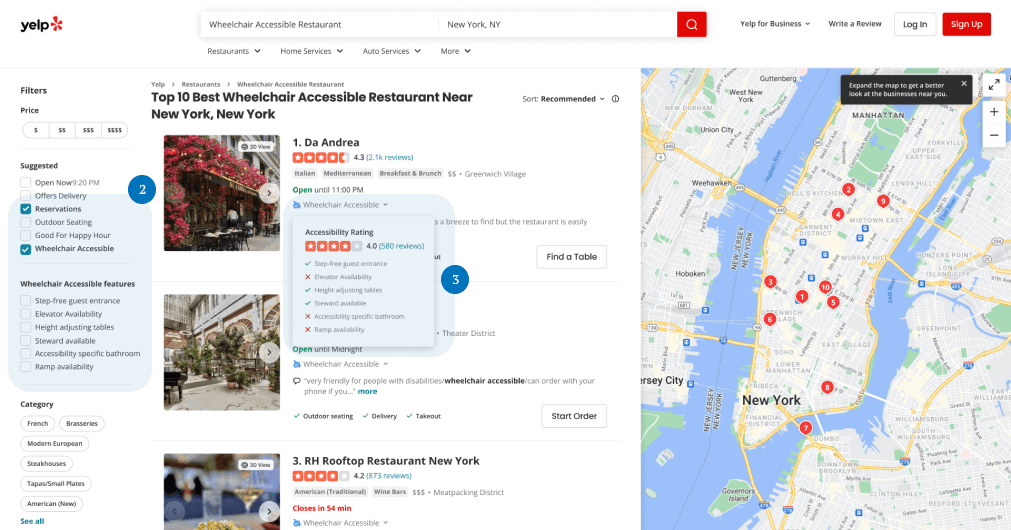
After landing on the result listing page, users who did not log in will automatically receive a [Feature 2: Notification banner to switch to the “Wheelchair Accessibility Focused View”]. After switching, the listing page will automatically show the results of restaurants with wheelchair-accessible features, and in the sidebar, [Feature 3: Detailed accessibility filters] will show up for a detailed filter. On the card of every individual restaurant, users are able to see [Feature 4: Detailed accessibility amenities checklist].
Feature 2, 3 & 4
Result Listing Page
After landing on the result listing page, users who did not log in will automatically receive a [Feature 2: Notification banner to switch to the “Wheelchair Accessibility Focused View”]. After switching, the listing page will automatically show the results of restaurants with wheelchair-accessible features, and in the sidebar, [Feature 3: Detailed accessibility filters] will show up for a detailed filter. On the card of every individual restaurant, users are able to see [Feature 4: Detailed accessibility amenities checklist].
Feature 2, 3 & 4
Result Listing Page
After landing on the result listing page, users who did not log in will automatically receive a [Feature 2: Notification banner to switch to the “Wheelchair Accessibility Focused View”]. After switching, the listing page will automatically show the results of restaurants with wheelchair-accessible features, and in the sidebar, [Feature 3: Detailed accessibility filters] will show up for a detailed filter. On the card of every individual restaurant, users are able to see [Feature 4: Detailed accessibility amenities checklist].
Feature 5, 6 & 4
Details Page
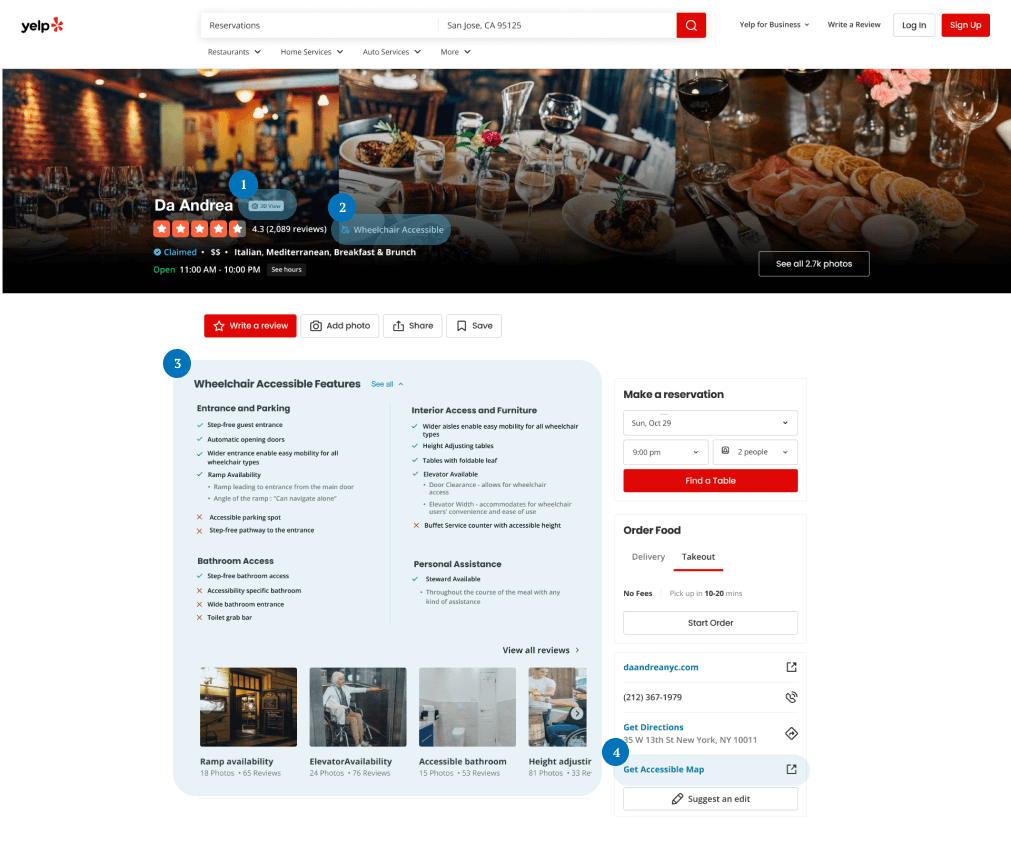
After landing on the restaurant detail page, the users can check not only the general information of the restaurant (the menu/environment/opening time… ) but also [Feature 5: detail list and photos of accessibility amenities]. They can also [Feature 8: check the accessibility interior layout] as they make reservations. Additionally, wheelchair users constantly look for trusted information and highly rely on reviews and community feedback. Hence we developed [Feature 6: tagged review filter] to help them efficiently find reviews with accessibility keywords, and [Feature 7: write reviews using keyword tags] to engage with the community.
Feature 5, 6 & 4
Details Page
After landing on the restaurant detail page, the users can check not only the general information of the restaurant (the menu/environment/opening time… ) but also [Feature 5: detail list and photos of accessibility amenities]. They can also [Feature 8: check the accessibility interior layout] as they make reservations. Additionally, wheelchair users constantly look for trusted information and highly rely on reviews and community feedback. Hence we developed [Feature 6: tagged review filter] to help them efficiently find reviews with accessibility keywords, and [Feature 7: write reviews using keyword tags] to engage with the community.
Feature 5, 6 & 4
Details Page
After landing on the restaurant detail page, the users can check not only the general information of the restaurant (the menu/environment/opening time… ) but also [Feature 5: detail list and photos of accessibility amenities]. They can also [Feature 8: check the accessibility interior layout] as they make reservations. Additionally, wheelchair users constantly look for trusted information and highly rely on reviews and community feedback. Hence we developed [Feature 6: tagged review filter] to help them efficiently find reviews with accessibility keywords, and [Feature 7: write reviews using keyword tags] to engage with the community.
08
Task Flow
08
Task Flow
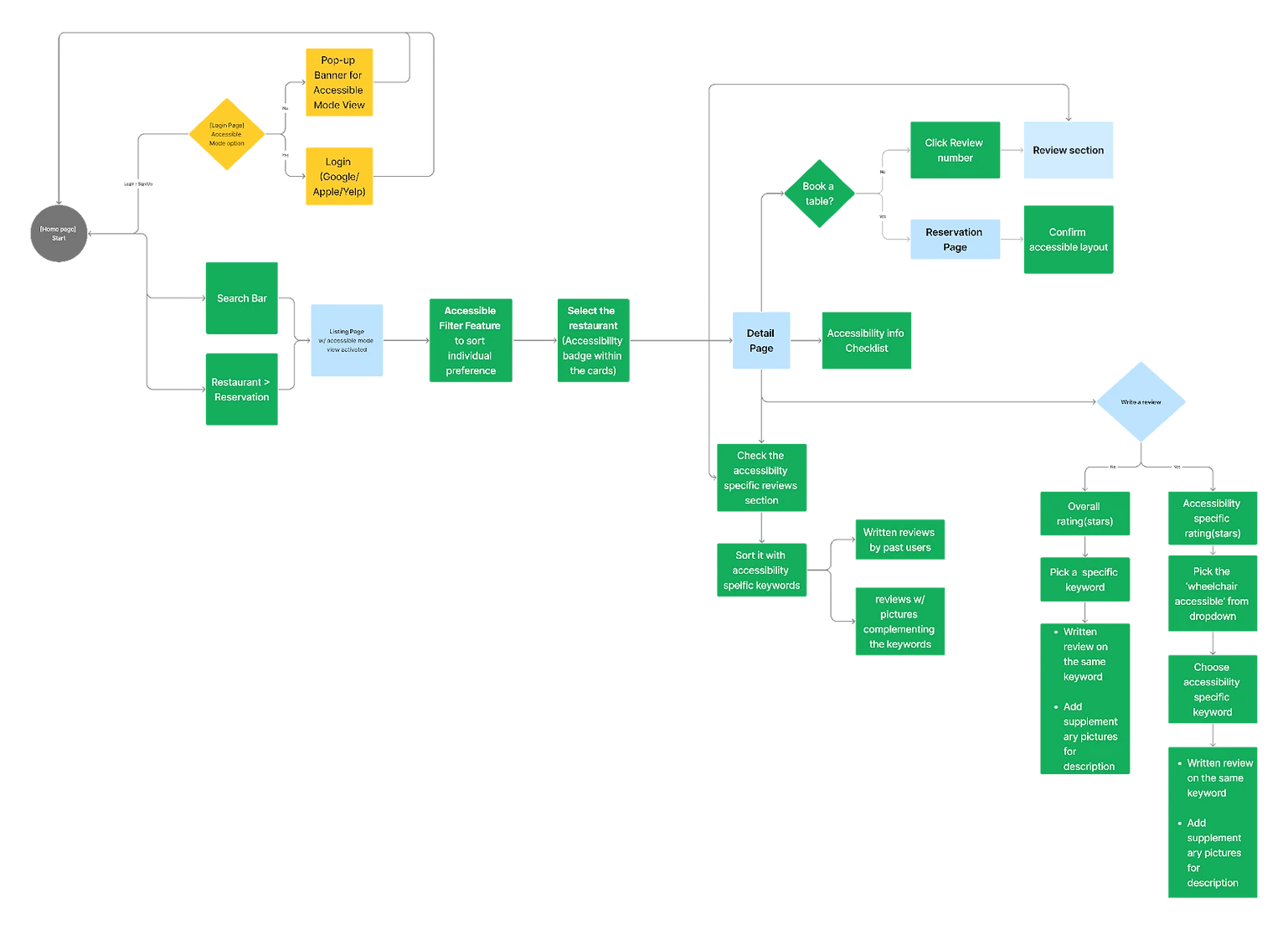
Based on our scope and design frame, the interventions incorporated into the flow specific for wheelchair users are mapped out in the diagram below.
Based on our scope and design frame, the interventions incorporated into the flow specific for wheelchair users are mapped out in the diagram below.
Based on our scope and design frame, the interventions incorporated into the flow specific for wheelchair users are mapped out in the diagram below.
Task Flow
Task Flow
The website flow includes login, listing page, restaurant detail page, viewing reviews, and booking a table. Enhancements at each stage include accessibility ratings, detailed feature checklists, filter options, review sorting by accessibility keywords, user-provided images, 3D interior views, and an accessibility seating map. These features ensure wheelchair users can access relevant information, prioritize their needs, and make informed dining decisions without unexpected issues.
Task Flow
Task Flow
The website flow includes login, listing page, restaurant detail page, viewing reviews, and booking a table. Enhancements at each stage include accessibility ratings, detailed feature checklists, filter options, review sorting by accessibility keywords, user-provided images, 3D interior views, and an accessibility seating map. These features ensure wheelchair users can access relevant information, prioritize their needs, and make informed dining decisions without unexpected issues.
09
Hi-Fi Wireframes
09
Hi-Fi Wireframes
We advanced the design by integrating eight new features into the existing information architecture:
We advanced the design by integrating eight new features into the existing information architecture:
We advanced the design by integrating eight new features into the existing information architecture:
Login/Sign -up Page
Wheelchair Accessibility Focussed View
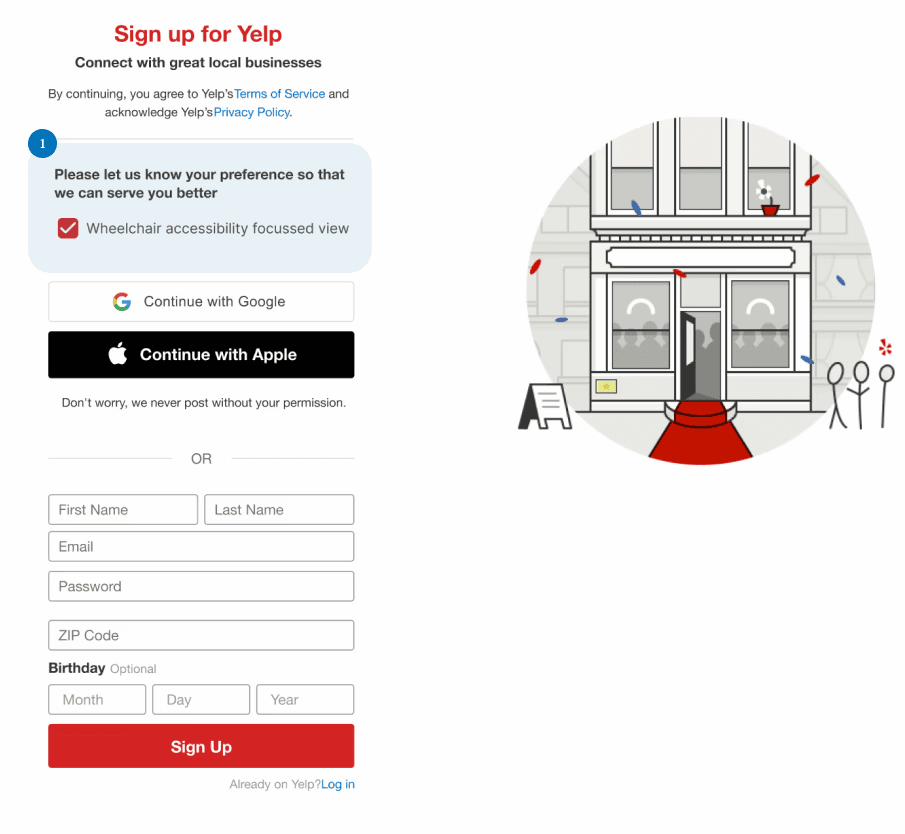
If the user chooses to login prior to browsing the restaurants. A modal is introduced asking them about their accessibility preference upon checking the box the system remembers their information and preference so as to provide wheelchair specific content.
Login/Sign -up Page
Wheelchair Accessibility Focussed View
If the user chooses to login prior to browsing the restaurants. A modal is introduced asking them about their accessibility preference upon checking the box the system remembers their information and preference so as to provide wheelchair specific content.
Login/Sign -up Page
Wheelchair Accessibility Focussed View
If the user chooses to login prior to browsing the restaurants. A modal is introduced asking them about their accessibility preference upon checking the box the system remembers their information and preference so as to provide wheelchair specific content.
Search Results
Wheelchair Accessibility Focussed View
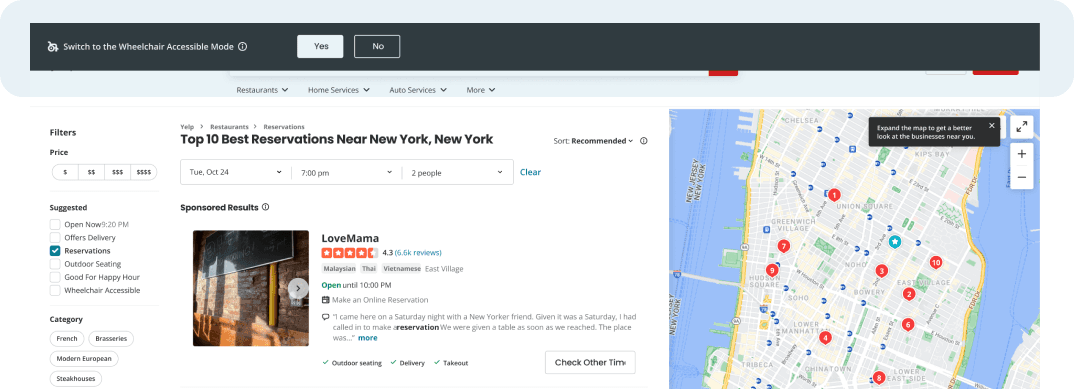
Notification banner to switch to the “Wheelchair Accessibility Focused View” > a top banner inquiring whether they would like to switch to the accessibility view. By selecting “Yes”, users will access prioritized accessibility-related content starting on the following page. Filter the key options that wheelchair users would typically look for.
Search Results
Wheelchair Accessibility Focussed View
Notification banner to switch to the “Wheelchair Accessibility Focused View” > a top banner inquiring whether they would like to switch to the accessibility view. By selecting “Yes”, users will access prioritized accessibility-related content starting on the following page. Filter the key options that wheelchair users would typically look for.
Results Listing Page
Accessibility amenities checklist
Users can confirm and compare wheelchair accessibility amenities of each restaurant in the card by clicking the dropdown.
Results Listing Page
Accessibility amenities checklist
Users can confirm and compare wheelchair accessibility amenities of each restaurant in the card by clicking the dropdown.
Results Listing Page
Accessibility amenities checklist
Users can confirm and compare wheelchair accessibility amenities of each restaurant in the card by clicking the dropdown.
Detail Page
Detailed Features & Visualization
3D view of the interiors > To better visualize the accessibility layout of the restaurant. Hence eliminating any surprise findings. Detailed Feature List > Specific accessibility features, including both available and unavailable features are represented for clear understanding. Accessibility Map > Additional information on the seating layout allows wheelchair users to manually select tables acc to the restaurants’ seating chart.
Detail Page
Detailed Features & Visualization
3D view of the interiors > To better visualize the accessibility layout of the restaurant. Hence eliminating any surprise findings. Detailed Feature List > Specific accessibility features, including both available and unavailable features are represented for clear understanding. Accessibility Map > Additional information on the seating layout allows wheelchair users to manually select tables acc to the restaurants’ seating chart.
Detail Page
Detailed Features & Visualization
3D view of the interiors > To better visualize the accessibility layout of the restaurant. Hence eliminating any surprise findings. Detailed Feature List > Specific accessibility features, including both available and unavailable features are represented for clear understanding. Accessibility Map > Additional information on the seating layout allows wheelchair users to manually select tables acc to the restaurants’ seating chart.
Review page
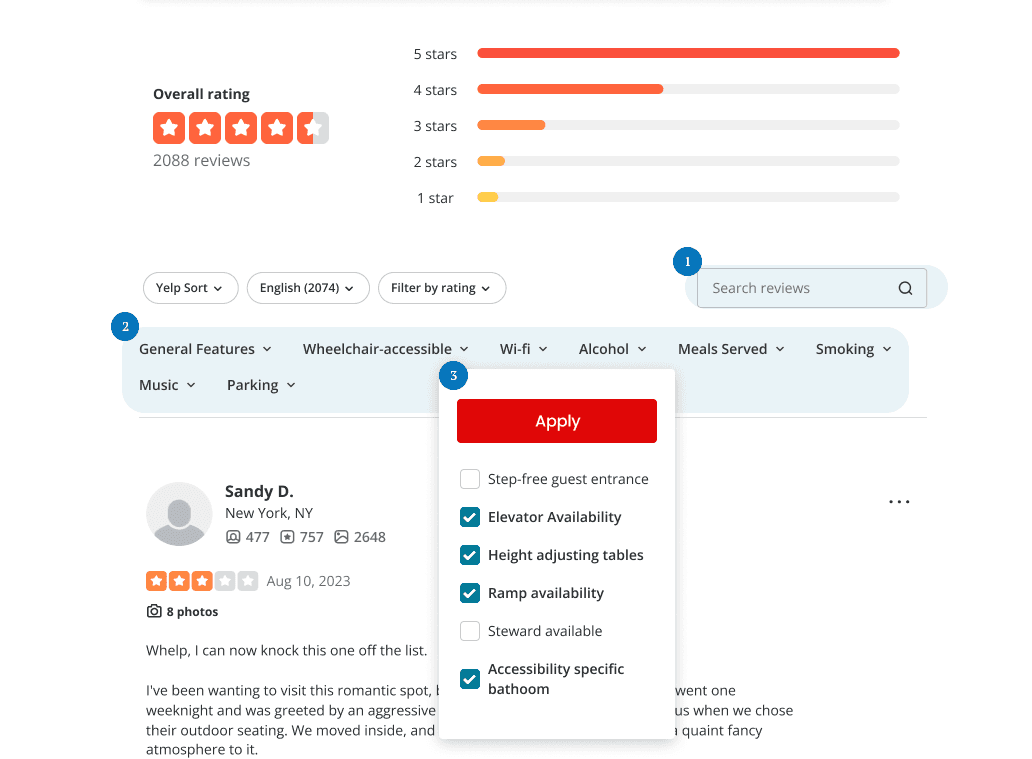
Reviews Filter Applied
Search bar: users can search the keywords to find what they want in the review sections. And all the keywords they searchd on will be bold in the review sections. Sorting users can hover on Wheelchair-accessible features to pull out the drop down. Detailed features to apply users can selct all the features they cared to see the review about them
Review page
Reviews Filter Applied
Search bar: users can search the keywords to find what they want in the review sections. And all the keywords they searchd on will be bold in the review sections. Sorting users can hover on Wheelchair-accessible features to pull out the drop down. Detailed features to apply users can selct all the features they cared to see the review about them
Review page
Reviews Filter Applied
Search bar: users can search the keywords to find what they want in the review sections. And all the keywords they searchd on will be bold in the review sections. Sorting users can hover on Wheelchair-accessible features to pull out the drop down. Detailed features to apply users can selct all the features they cared to see the review about them
Review page
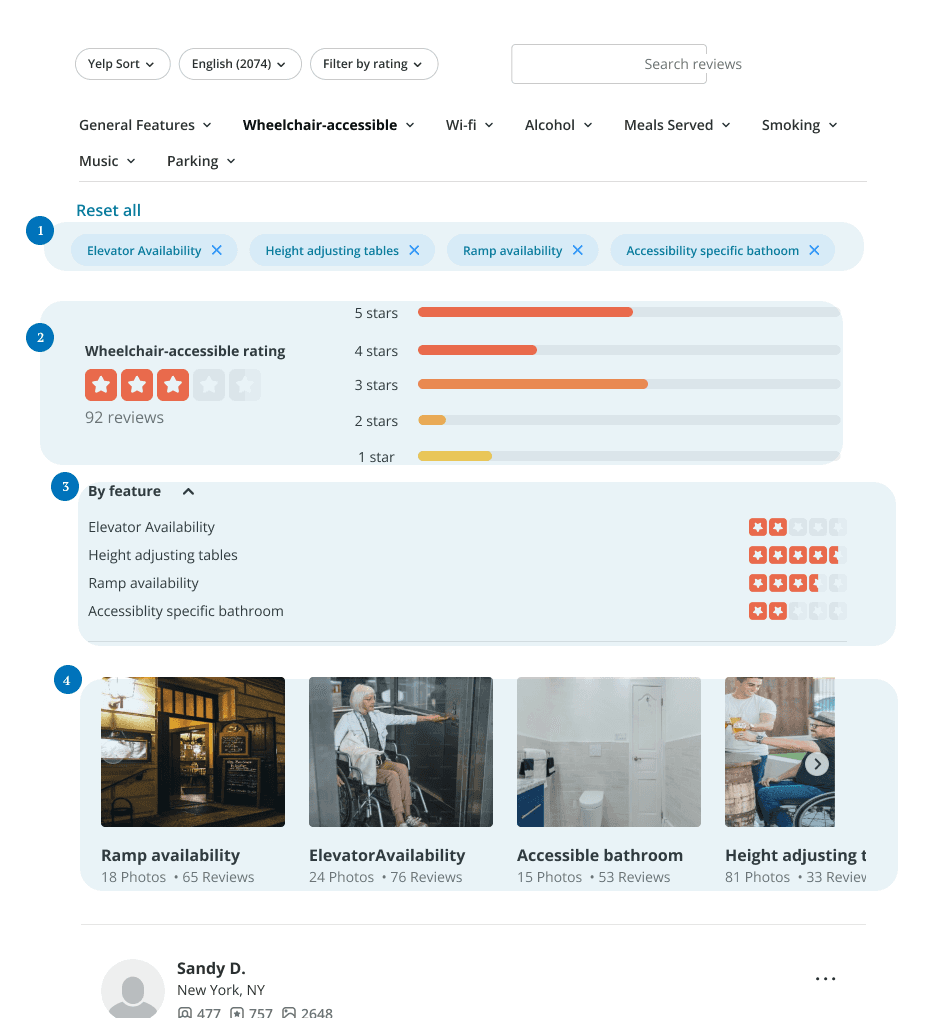
Reviews Result
Taged features users can see their selected features here, and they can either reset all or they can cancel any of that by clicking the cross icon. Wheelchiar-accessibility rating users can see the wheelchair-accessibility rating rather than the general rating here. Rating by features users can see more detailed feautres rating by clicking the drop down icon. Image Gallery users can see all the images about their selected features here to know the real situation about the restaurant to make sure the credibility.
Review page
Reviews Result
Taged features users can see their selected features here, and they can either reset all or they can cancel any of that by clicking the cross icon. Wheelchiar-accessibility rating users can see the wheelchair-accessibility rating rather than the general rating here. Rating by features users can see more detailed feautres rating by clicking the drop down icon. Image Gallery users can see all the images about their selected features here to know the real situation about the restaurant to make sure the credibility.
Review page
Reviews Result
Taged features users can see their selected features here, and they can either reset all or they can cancel any of that by clicking the cross icon. Wheelchiar-accessibility rating users can see the wheelchair-accessibility rating rather than the general rating here. Rating by features users can see more detailed feautres rating by clicking the drop down icon. Image Gallery users can see all the images about their selected features here to know the real situation about the restaurant to make sure the credibility.
Review page
Write A Review
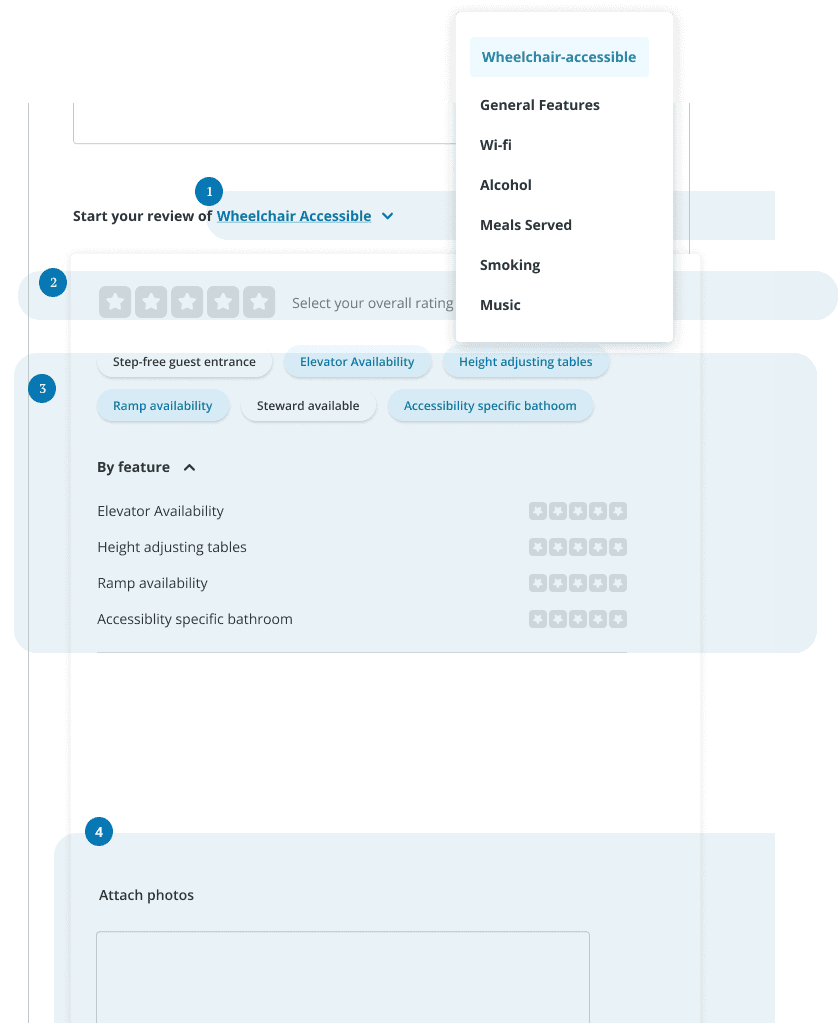
On the "Write a Review" page, users can give an overall rating and also categorize their ratings based on specific features, focusing their reviews on aspects they find most relevant. They have the option to use predefined tags that match those in the review sections, allowing them to assign detailed ratings to these features and add photos. This system helps users provide targeted feedback and visual references, aiding others in making informed decisions based on specific accessibility features.
Review page
Write A Review
On the "Write a Review" page, users can give an overall rating and also categorize their ratings based on specific features, focusing their reviews on aspects they find most relevant. They have the option to use predefined tags that match those in the review sections, allowing them to assign detailed ratings to these features and add photos. This system helps users provide targeted feedback and visual references, aiding others in making informed decisions based on specific accessibility features.
Review page
Write A Review
On the "Write a Review" page, users can give an overall rating and also categorize their ratings based on specific features, focusing their reviews on aspects they find most relevant. They have the option to use predefined tags that match those in the review sections, allowing them to assign detailed ratings to these features and add photos. This system helps users provide targeted feedback and visual references, aiding others in making informed decisions based on specific accessibility features.
Reservation page
Reservation
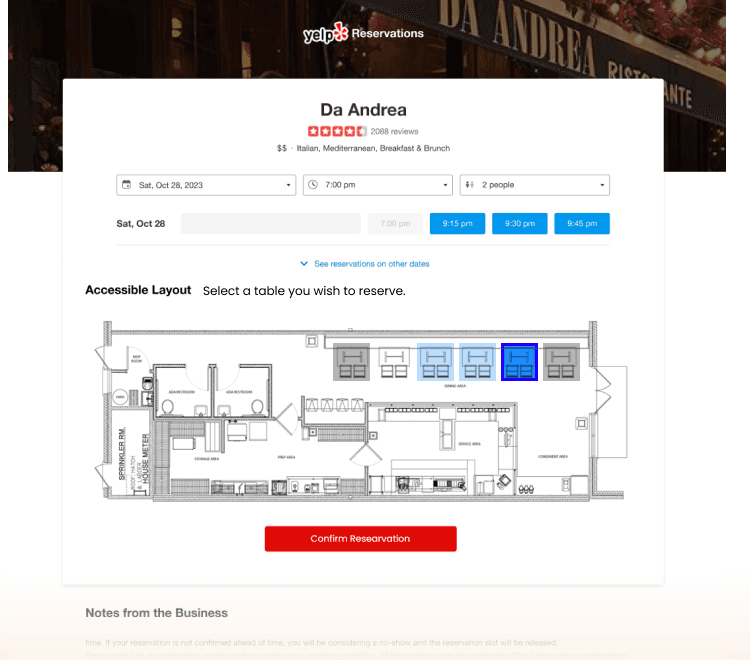
Seating Chart To better visualize the accessibility layout of the restaurant. Informs users on which tables are accessible and also allows user to choose specific table while reserving.
Reservation page
Reservation
Seating Chart To better visualize the accessibility layout of the restaurant. Informs users on which tables are accessible and also allows user to choose specific table while reserving.
Reservation page
Reservation
Seating Chart To better visualize the accessibility layout of the restaurant. Informs users on which tables are accessible and also allows user to choose specific table while reserving.
10
Usability Testing
10
Usability Testing
10
Usability Testing
Task Scenarios: Imagine you are a wheelchair user who is looking for an accessible restaurant through the Yelp website
Task Scenarios: Imagine you are a wheelchair user who is looking for an accessible restaurant through the Yelp website
Task Scenarios: Imagine you are a wheelchair user who is looking for an accessible restaurant through the Yelp website
01 Try to sign up or log in
01 Try to sign up or log in
02 Start searching for an accessible restaurant
02 Start searching for an accessible restaurant
03 Find if you can narrow down some options
03 Find if you can narrow down some options
04 See if you can read reviews about accessibility
04 See if you can read reviews about accessibility
06 See if you can book a table
06 See if you can book a table
Usability Testing Results
Our Revisions
Usability Testing Results
Our Revisions
Usability Testing Results
Our Revisions
Top Banner
Top Banner Visibility Enhancement
Top Banner
Top Banner Visibility Enhancement
Top Banner
Top Banner Visibility Enhancement
Detail Page
Detail Page Information Simplification
Detail Page
Detail Page Information Simplification
Detail Page
Detail Page Information Simplification
Reservation Page
Reservation Page Seats Selection
Reservation Page
Reservation Page Seats Selection
Reservation Page
Reservation Page Seats Selection
Reviews Page
Reviews Section Rating Information
Reviews Page
Reviews Section Rating Information
Reviews Page
Reviews Section Rating Information
Revision 1
Top Banner Visibility
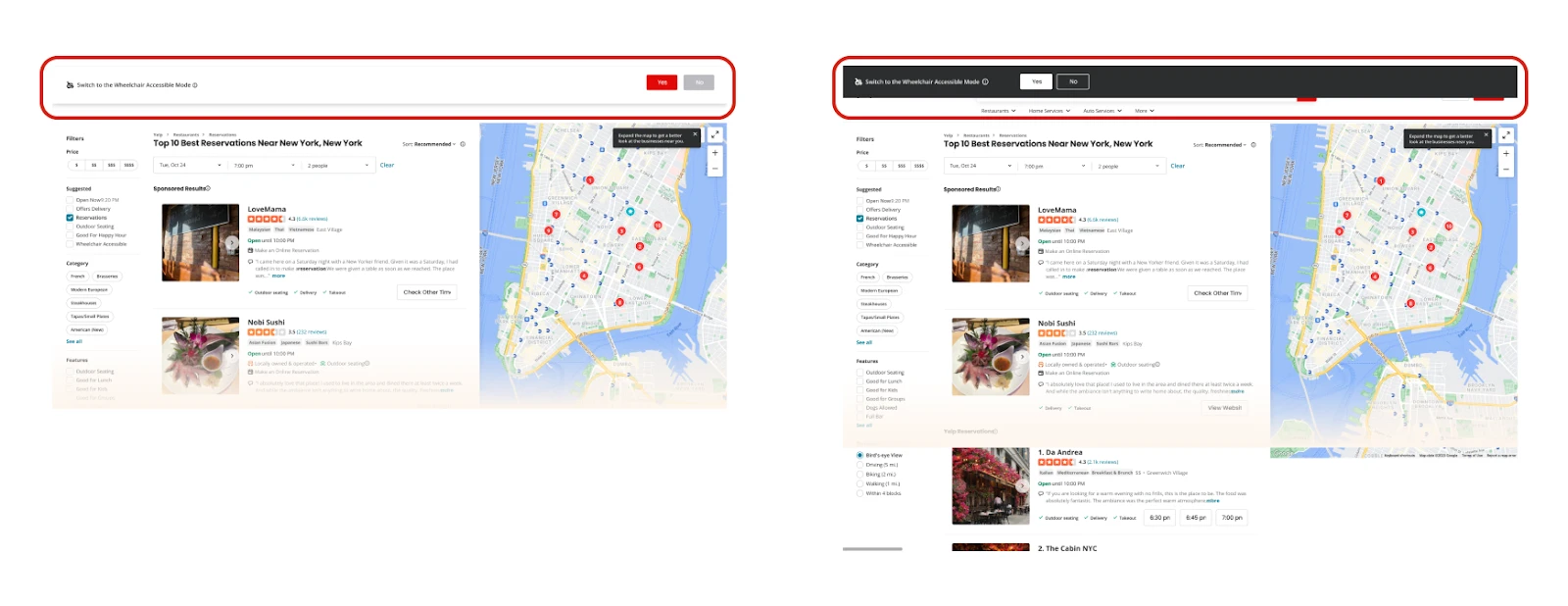
Firstly, we enhanced the visibility of the top banner in our revision process. Many users initially overlooked the banner that prompts the switch to accessibility mode. To remedy this, we implemented two key changes: 1. Darkened Background Color: We intensified the background color of the top banner to make it more eye-catching and prominent. 2. CTA Button Repositioning: We moved the Call-to-Action (CTA) button to a more prominent position next to the prompt, ensuring it catches users' attention more effectively.
Revision 1
Top Banner Visibility
Firstly, we enhanced the visibility of the top banner in our revision process. Many users initially overlooked the banner that prompts the switch to accessibility mode. To remedy this, we implemented two key changes: 1. Darkened Background Color: We intensified the background color of the top banner to make it more eye-catching and prominent. 2. CTA Button Repositioning: We moved the Call-to-Action (CTA) button to a more prominent position next to the prompt, ensuring it catches users' attention more effectively.
Revision 2
Detail Page Simplify
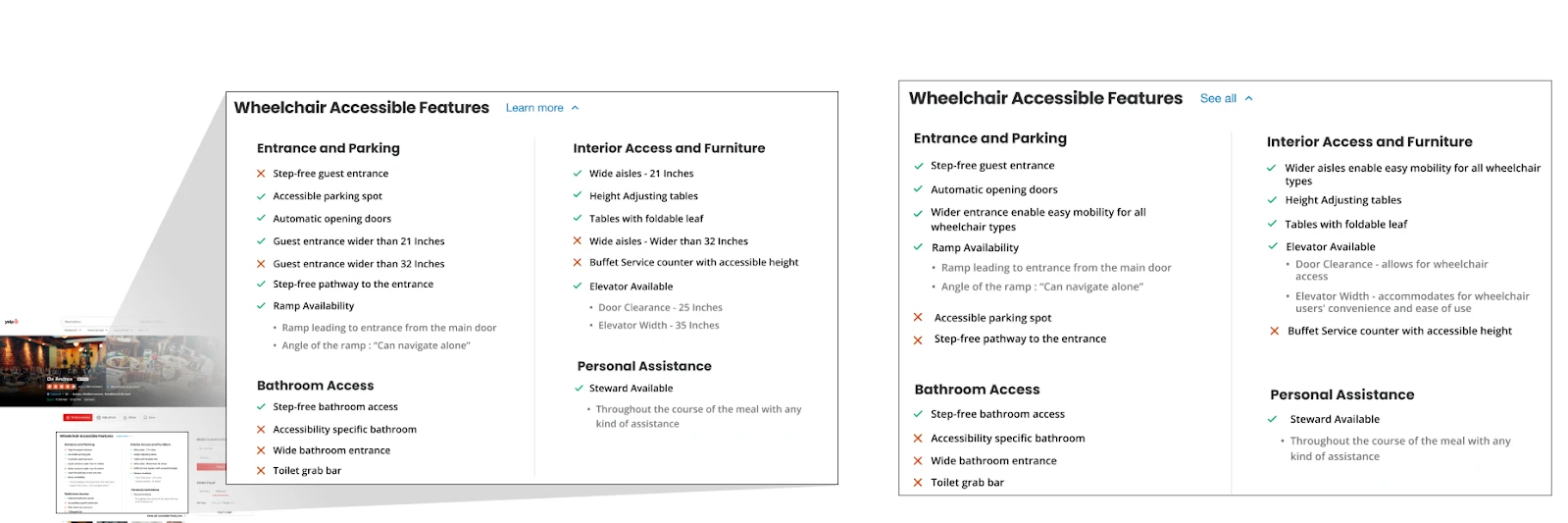
To address feedback that the accessibility information on the detail page was overwhelming and cumbersome to engage with, we implemented the following updates to enhance user-friendliness: 1. List Simplification: We simplified the list by removing similar features and rearranging the remaining items for a cleaner, more streamlined presentation. 2. Feature Prioritization: We prioritized the display of available features by moving them to the top of the list, while unavailable features were moved to the bottom, making the most relevant information immediately accessible.
Revision 2
Detail Page Simplify
To address feedback that the accessibility information on the detail page was overwhelming and cumbersome to engage with, we implemented the following updates to enhance user-friendliness: 1. List Simplification: We simplified the list by removing similar features and rearranging the remaining items for a cleaner, more streamlined presentation. 2. Feature Prioritization: We prioritized the display of available features by moving them to the top of the list, while unavailable features were moved to the bottom, making the most relevant information immediately accessible.
Revision 3
Seat Selection on Reservation Page
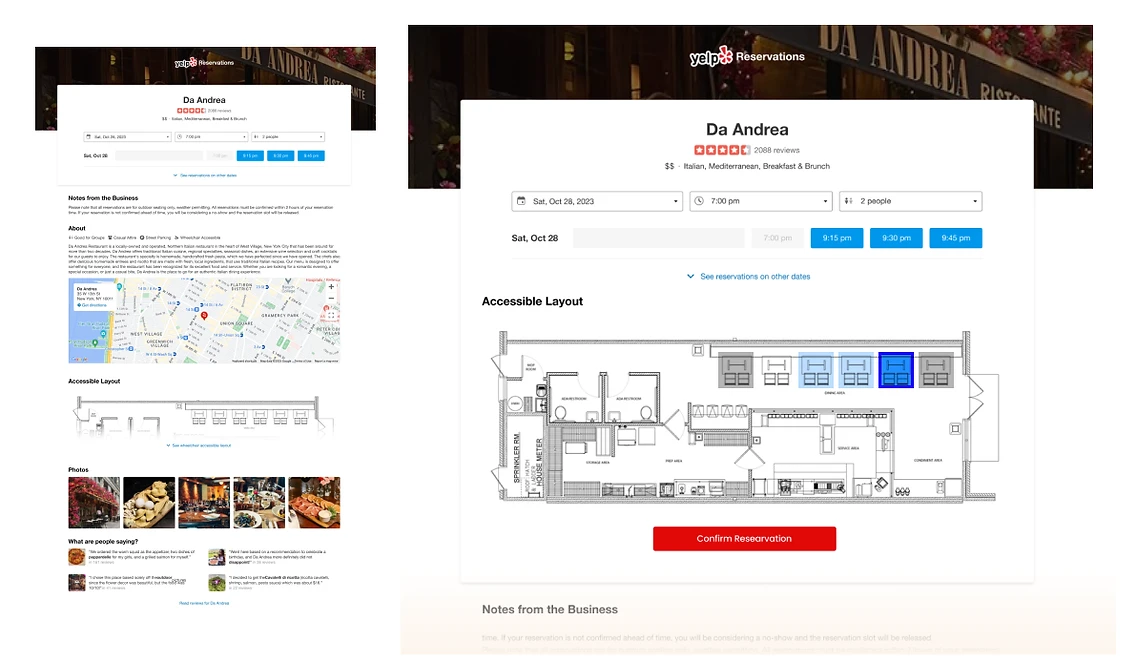
To meet user needs and simplify the reservation process, we introduced a seat selection section on the reservation page, modeled after airline seating charts: 1. Repositioning of Seating Map: We moved the restaurant layout map to the top of the page to enhance its visibility, ensuring it's the first thing users see. 2. Color-Coded Seating System: We implemented a color-coded system to clarify seat availability—gray indicates taken seats, light blue shows available seats, and dark blue denotes selected seats.
Revision 3
Seat Selection on Reservation Page
To meet user needs and simplify the reservation process, we introduced a seat selection section on the reservation page, modeled after airline seating charts: 1. Repositioning of Seating Map: We moved the restaurant layout map to the top of the page to enhance its visibility, ensuring it's the first thing users see. 2. Color-Coded Seating System: We implemented a color-coded system to clarify seat availability—gray indicates taken seats, light blue shows available seats, and dark blue denotes selected seats.
Revision 4
Accessibility Rating
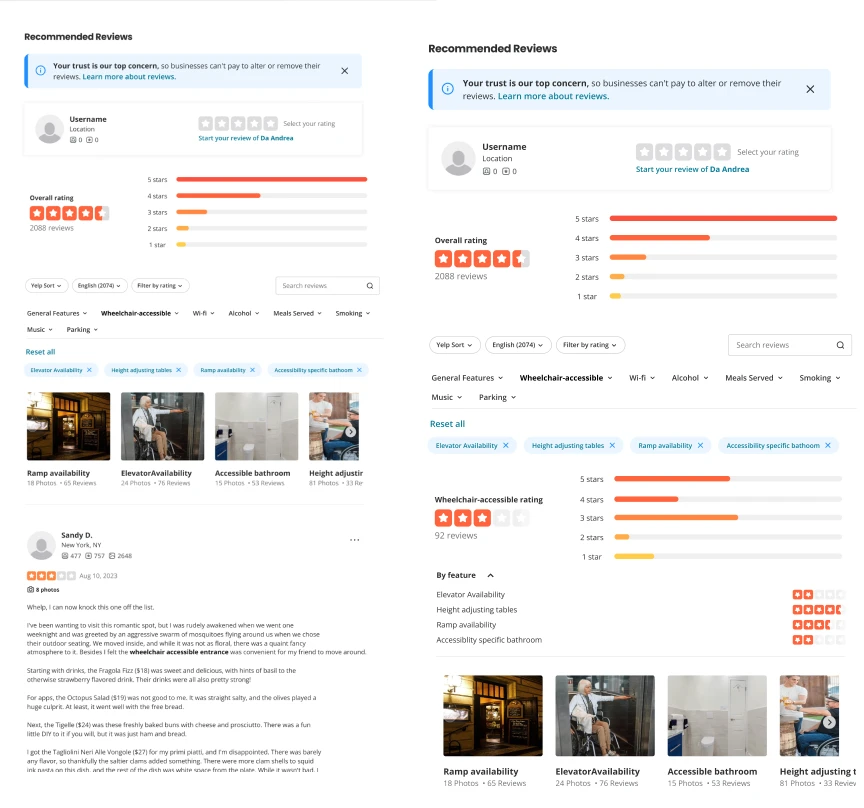
To enhance the provision of detailed accessibility information on our platform, we introduced a new feature in the review area: 1. Dedicated Accessible Rating Section: We added a specific section for accessibility-related reviews and ratings. This section is designed as an accessible chart that displays detailed, user-submitted reviews focusing exclusively on accessibility aspects of restaurants.
Revision 4
Accessibility Rating
To enhance the provision of detailed accessibility information on our platform, we introduced a new feature in the review area: 1. Dedicated Accessible Rating Section: We added a specific section for accessibility-related reviews and ratings. This section is designed as an accessible chart that displays detailed, user-submitted reviews focusing exclusively on accessibility aspects of restaurants.